MotionDeck

Open sourceWindows + browser

Record. Arrange. Animate. Done.

A beginner-friendly desktop motion-design tool that turns any screen recording, recorded or imported, into a cinematic app demo. Auto Tap, phone frames, smart camera focus, motion presets, and MP4 export.

MotionDeck is built for founders and makers who need a polished product demo without learning a keyframe editor: record or import, arrange, add motion, and export.

View on GitHubWindows + browser

Get the source and build instructions on GitHub. Recordings and projects stay on your machine.
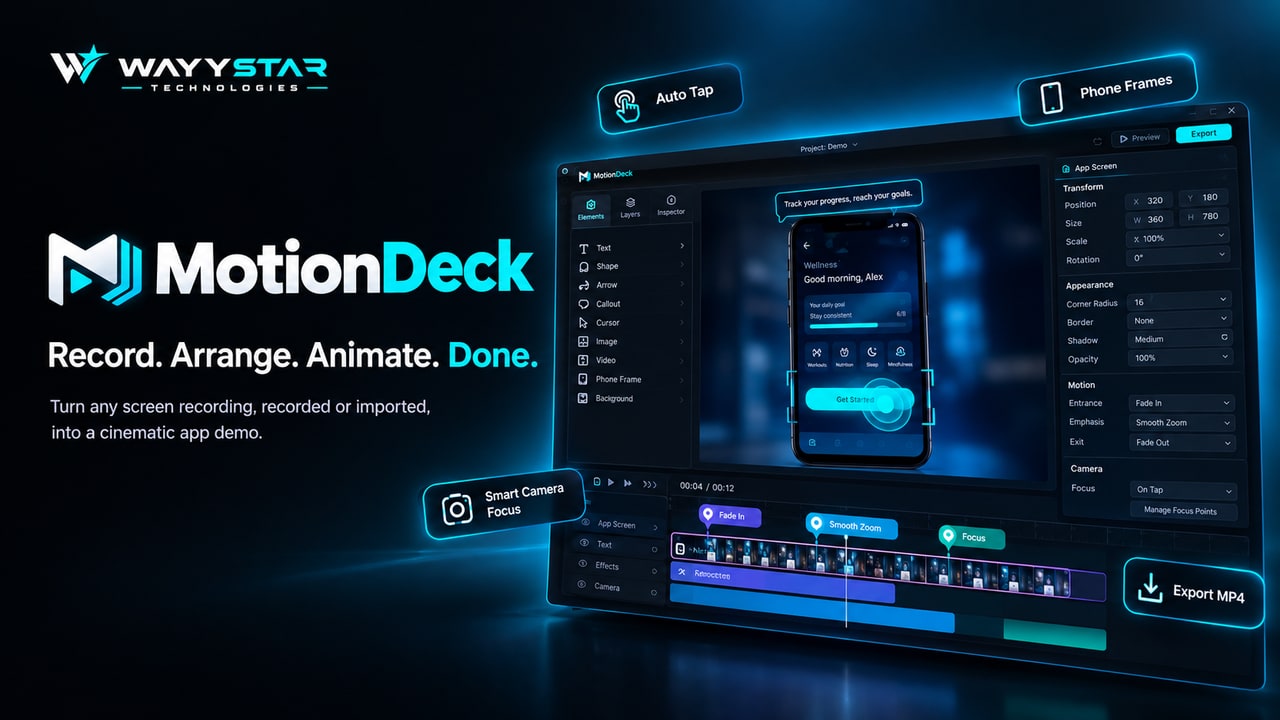
MotionDeck: Record. Arrange. Animate. Done. Turn any screen recording into a cinematic app demo with Auto Tap, phone frames, smart camera focus, and MP4 export.

Why it matters

The problem

Screen recordings make weak demos on their own, and pro motion tools are slow to learn. MotionDeck adds taps, phone frames, camera focus, and motion to any clip in a few clicks, and your recordings and projects stay on your machine.

The product

What it is

A beginner-friendly screen recording editor and motion-design tool for app demo videos: record or import a clip, frame it, add motion, and export an MP4.

What you can do

  • Record or import
  • Auto Tap
  • Phone frames
  • Smart camera focus
  • Motion presets
  • Export MP4

Where you can use it

  • Windows 10 / 11 desktop app
  • Chromium browsers (edit, import, preview, export)

What's inside

Key features

Record or import

Record a screen, window, or region, or import an MP4, MOV, or WebM. Recorded and imported footage work the same way.

Auto Tap

Detect taps in a recording and show them as tap markers, then review the guesses or add interactions by hand.

Phone frames

Crop an Android emulator recording down to the app screen and nest it in a phone frame for a clean mobile demo.

Smart camera focus

Guide attention with camera focus and smooth zoom on the moments that matter, without hand-built keyframes.

Timeline with motion presets

Add entrance, emphasis, and camera motion like fade, smooth zoom, and focus, then preview it all on the timeline.

Export MP4

Export through the same compositor as the preview. MP4 via WebCodecs, with WebM and GIF as fallbacks.

Tech highlights

Engineering

  • Desktop app built with Tauri, React, and TypeScript, open source on GitHub under the MIT license.
  • One compositor renders both the editor preview and the export, so what you see is what you ship.
  • MP4 export via WebCodecs H.264, with WebM and GIF fallbacks and audio mixdown from the clip.
  • Recordings and projects stay on your machine. Media is stored locally (OPFS) with ffmpeg.wasm or system FFmpeg for unusual imports.

FAQ

Questions people ask

Who built MotionDeck?
MotionDeck was built by WAYYSTAR Technologies, founded by Anotidaishe Wellington Madzingautswa.
Can I use a video I already recorded?
Yes. Import an MP4, MOV, or WebM and it works exactly like a clip recorded inside MotionDeck: move, crop, trim, animate, frame, and export it.
Does MotionDeck upload my recordings?
No. Recordings and projects stay on your machine. Preview and export run locally.
How do I turn a screen recording into an app demo?
Record or import your clip in MotionDeck, crop it to the app screen and add a phone frame, let Auto Tap mark the taps, add motion presets like fade, smooth zoom, and focus on the timeline, then export an MP4.
Is MotionDeck free?
Yes. MotionDeck is free and open source under the MIT license.
Which platforms does MotionDeck run on?
MotionDeck runs as a Windows 10 and Windows 11 desktop app, and in Chromium browsers for editing, import, preview, and export.
Where do I get MotionDeck?
MotionDeck is open source on GitHub.

Status

Where it is now

MotionDeck is available as an open-source project on GitHub. Clone it, run it in the browser or as a Windows desktop app, and turn your next screen recording into a demo.

View on GitHubWindows + browser